
How To Repair Black And Decker Mouse Sander


The Black and Decker Mouse Sander is a versatile tool that is commonly used for sanding and smoothing surfaces. However, like any power tool, it may encounter issues over time. Whether it’s a broken sanding pad, a malfunctioning power switch, or a worn-out motor, knowing how to repair your Black and Decker Mouse Sander can save you time and money, and get your project back on track.
Before attempting any repairs, it’s important to ensure that the sander is unplugged and turned off. Safety should always be a top priority when working with power tools. Once you’ve taken the necessary precautions, you can begin diagnosing and repairing the specific issue with your sander.
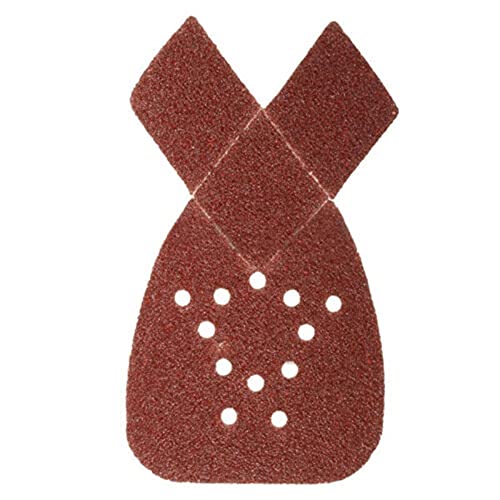
One common problem with the Black and Decker Mouse Sander is a broken or worn-out sanding pad. To replace the sanding pad, start by removing the old pad by unscrewing the screws that hold it in place. Then, simply attach the new sanding pad by aligning it with the holes on the sander and tightening the screws.
If your sander is not turning on or off, the power switch may be the culprit. To replace the power switch, you’ll need to disassemble the sander. Start by removing the sanding pad and any screws that hold the housing together. Once the housing is open, locate the power switch and disconnect the wires attached to it. Install the new power switch by connecting the wires in the same way they were attached to the old switch. Then, reassemble the sander.

In some cases, the motor of the Black and Decker Mouse Sander may become worn out or burnt. If you suspect this is the issue, it’s best to contact a professional for repair or consider purchasing a new sander. Attempting to repair a motor yourself can be dangerous and may cause further damage to the sander.
By following these steps and taking the necessary precautions, you can successfully repair your Black and Decker Mouse Sander and extend its lifespan. Remember to always prioritize safety and consult a professional if you’re unsure about any repairs.
Black And Decker Mouse Sander: An Overview
The Black and Decker Mouse Sander is a versatile and compact handheld power tool that is designed for sanding and refining various surfaces. It is commonly used for smoothing wood, removing paint or rust, and preparing surfaces for painting or staining.
This sander is named “Mouse” due to its small and ergonomic design, which allows for easy maneuverability and control. With its lightweight and comfortable grip, it is ideal for working in tight spaces or for extended periods without causing fatigue. The Mouse Sander also features a teardrop-shaped base, which enables users to access corners and crevices with ease.
One of the key features of the Black and Decker Mouse Sander is its detail finger attachment. This attachment snaps onto the base and enables users to reach narrow areas like corners and edges that are not easily accessible with larger sanders. The detail finger attachment can be fitted with various sanding pads, allowing users to achieve different finishes and textures.
In addition to its versatility, the Black and Decker Mouse Sander is known for its powerful performance. It is equipped with a motor that delivers high-speed sanding, ensuring efficient and effective results. The sander also has a dust collection system that helps keep the work area clean and free from debris, enhancing visibility and reducing the need for frequent cleanups.
Key Features of Black and Decker Mouse Sander:
- Compact and ergonomic design: The mouse-shaped design provides easy maneuverability and control, making it suitable for small and tight spaces.
- Detail finger attachment: Allows for sanding in narrow areas and corners that are hard to reach with conventional sanders.
- High-speed motor: Enables fast and efficient sanding for quick completion of projects.
- Dust collection system: Keeps the work area clean and improves visibility while reducing the need for frequent cleanups.
Overall, the Black and Decker Mouse Sander is a reliable and effective power tool that offers versatility, comfort, and precision in sanding various surfaces. Whether you are a professional woodworker or a DIY enthusiast, this sander can be a valuable addition to your toolkit.
Section 1
If you’re experiencing issues with your Black and Decker Mouse Sander, there are a few troubleshooting steps you can take to try and resolve the problem.
Step 1: Check the Power Source
The first thing you should do is check that the sander is properly connected to a power source. Make sure the power cord is securely plugged into an outlet and that there are no breaks or frayed wires in the cord. If you’re using an extension cord, ensure that it is in good condition and capable of delivering enough power to the sander.
Step 2: Inspect the Sanding Pad
Next, examine the sanding pad to ensure it is securely attached to the sander. Sometimes, the pad can become loose or damaged, which can affect the sander’s performance. If necessary, replace the sanding pad with a new one.
Step 3: Clean the Sander
Dirt, dust, and debris can accumulate in the sander over time, which can cause it to malfunction. Use a clean, dry cloth to wipe away any debris from the sander’s exterior. If the issue persists, you may need to take apart the sander and clean the internal components.
Step 4: Check for Jammed Sanding Sheets
The Black and Decker Mouse Sander uses sanding sheets that can become jammed or clogged with material. Remove the sanding sheets and inspect them for any obstructions. If necessary, replace the sheets with new ones.
Step 5: Contact Customer Support
If none of the above steps resolve the issue with your Black and Decker Mouse Sander, it may be a more serious problem that requires professional repair. Contact Black and Decker customer support for assistance and further troubleshooting advice.
Remember to always exercise caution when working with power tools, and unplug the sander before performing any repairs or troubleshooting.
Common Issues with Black And Decker Mouse Sander
1. Power Problems
If your Black and Decker Mouse Sander is not turning on or is not receiving power, there are a few potential causes to consider.
First, check the power cord and make sure it is securely plugged into a functioning electrical outlet. If the power cord is damaged or frayed, it may need to be replaced.
Next, check the power switch on the sander. Ensure that it is in the “on” position and functioning properly. If the switch is faulty, it will need to be replaced.
Lastly, check the power supply. If the sander is battery-powered, make sure the batteries are inserted correctly and fully charged. If the sander is corded, check the power supply for any issues.
2. Sandpaper Issues
The sandpaper on your Black and Decker Mouse Sander may wear out over time and need to be replaced. If you notice the sandpaper is not effectively sanding or is tearing easily, it is time for a new sheet.
To replace the sandpaper, simply slide the old sheet off and slide a new one onto the sander’s base. Make sure the new sheet is securely attached before using the sander.
3. Dust Collection Problems
The Black and Decker Mouse Sander is equipped with a dust collection system to help keep your work area clean. If you are experiencing issues with dust collection, there are a few possible causes to check.
First, make sure the dust canister or bag is properly attached and not full. Empty or replace the canister or bag as needed.
Next, check the dust collection mechanism for any blockages. Clear any debris or dust that may be obstructing the system.
If the dust collection system is still not working properly, it may be a mechanical issue that requires professional repair.
4. Vibration and Noise
Excessive vibration or noise from your Black and Decker Mouse Sander can indicate a problem. Check the sander for any loose or damaged parts.
Inspect the sanding pad and ensure it is securely attached. If the pad is worn or damaged, it may need to be replaced.
Additionally, check the bearings and other moving parts for signs of wear or damage. Lubricate or replace any parts as necessary.
If the vibration or noise persists, it is recommended to consult a professional for further inspection and repair.
Section 2
Once you have identified the problem with your Black and Decker Mouse Sander, you can proceed with the necessary repairs. Here are some common issues that you may encounter and the corresponding solutions:
| Problem | Solution |
|---|---|
| The sander does not turn on. | Check the power source and make sure the sander is properly plugged in. If it is, try using a different outlet or replacing the power cord. If the problem persists, the on/off switch may be faulty and will need to be replaced. |
| The sander is not sanding effectively. | First, check the sandpaper to ensure it is securely attached and not worn out. Replace the sandpaper if necessary. If the sandpaper is fine, the problem may be with the sanding pad. Remove the pad and check for any damage or excessive wear. If needed, replace the pad with a new one. |
| The sander is making strange noises. | This could indicate a problem with the motor or the bearings. Disassemble the sander and inspect the motor and bearings for any signs of damage or wear. If any parts are damaged, you will need to replace them. Lubricating the bearings with oil may also help reduce noise. |
| The dust collection system is not working. | Check the dust collection bag or canister to ensure it is properly attached and not full. Clean or replace the bag/canister as needed. If the problem persists, inspect the dust collection port and filter for any blockages or damage. Clear any obstructions or replace the filter if necessary. |
Remember to always refer to the Black and Decker Mouse Sander’s user manual or contact the manufacturer for specific repair instructions that may apply to your model. If you are unsure or uncomfortable with performing the repairs yourself, it is recommended to seek professional assistance.
How to Diagnose the Problem with Your Black And Decker Mouse Sander
If you’re experiencing issues with your Black and Decker Mouse Sander, it’s important to diagnose the problem correctly in order to fix it. Here are some steps you can take to identify the issue:

-
Check the power source: Make sure your sander is properly connected to a power outlet or its battery is charged. If the sander is not receiving power, it won’t function correctly.
-
Inspect the sandpaper: Check if the sandpaper is properly attached to the sander’s base. If the sandpaper is torn, worn out, or not aligned correctly, it can affect the sander’s performance.
-
Clean the sander: Dust and debris can accumulate inside the sander, affecting its functionality. Use compressed air or a small brush to remove any dirt or debris from the sander’s vents and internal components.
-
Examine the switch: The switch on the sander may be faulty or stuck. Test the switch to ensure it moves freely and is functioning properly.
-
Inspect the motor brushes: The motor brushes are responsible for transferring electricity to the motor. If the brushes are worn out or damaged, they may need to be replaced.
-
Check for loose connections: Inspect the power cord and any other connections on the sander. Loose or damaged connections can cause power issues.
By following these steps, you should be able to identify the problem with your Black and Decker Mouse Sander. If the issue persists, it may be necessary to take your sander to a professional for repair or replace it with a new one.
Section 3: Troubleshooting Common Issues with the Black and Decker Mouse Sander
If you are experiencing issues with your Black and Decker Mouse Sander, there are several common problems that you can troubleshoot before considering repair or replacement.

1. Power Issues: If your sander is not turning on or is not operating at full power, check the power source. Ensure that the power cord is securely plugged into a working outlet or that the battery is fully charged. If using a power cord, check for any damage or fraying that may be interfering with the power supply. If the power source seems to be functioning correctly, but the sander still does not work, there may be an internal issue that requires repair.
2. Sandpaper Issues: If the sandpaper is not adhering to the sander or is wearing out quickly, there may be an issue with the hook and loop system. Clean the surface of the sander and the back of the sandpaper to remove any debris that may be interfering with the adhesive. If the problem persists, replace the sandpaper with a new one that is specifically designed for the Black and Decker Mouse Sander.
3. Dust Collection Issues: If the dust collection system is not effectively collecting dust while sanding, check for any obstructions in the collection port or the dust canister. Clean out any accumulated dust or debris to ensure proper airflow. If the problem continues, the dust collection system may need to be repaired or replaced.
4. Vibrations or Noise Issues: If the sander produces excessive vibrations or makes unusual noises while in operation, ensure that the sanding pad is installed correctly and securely. If the pad is damaged or worn, replace it with a new one. Excessive vibrations or noises could also indicate a problem with the motor or internal components, which may require repair.
Note: It is recommended to consult the user manual or contact the manufacturer for specific troubleshooting steps or to arrange for professional repair if the above solutions do not resolve the issue.
Step-by-Step Guide to Repairing Your Black And Decker Mouse Sander
If your Black and Decker Mouse Sander is not functioning properly, here is a step-by-step guide to help you repair it:

|
Step 1: |
Disconnect the sander from the power source and make sure it is turned off. |
|
Step 2: |
Inspect the sanding pad for any signs of wear or damage. If the pad is worn out or damaged, it will need to be replaced. Refer to the user manual for the correct replacement part. |
|
Step 3: |
Check the sanding paper for any tears or excessive wear. If the sanding paper is damaged, it is recommended to replace it with a new sheet for optimal performance. |
|
Step 4: |
Inspect the power cord for any visible signs of damage. If there are any cuts or frayed wires, it is important to replace the power cord to avoid any electrical hazards. |
|
Step 5: |
Check the dust collection container for any blockages. Empty the container and clean it thoroughly to ensure proper suction and dust collection. |
|
Step 6: |
If none of the above steps resolve the issue, it is recommended to contact the manufacturer or a professional repair service for further assistance. Attempting to repair the sander without proper knowledge or experience may void the warranty or cause further damage. |
By following this step-by-step guide, you can troubleshoot and repair your Black and Decker Mouse Sander, ensuring it is in optimal working condition for your sanding needs.
Questions and answers
What are some common problems that can occur with a Black and Decker Mouse sander?
Some common problems that can occur with a Black and Decker Mouse sander include the sander not turning on, the sandpaper not sticking to the sander, and the sander not sanding evenly.
How can I fix a Black and Decker Mouse sander that is not turning on?
If your Black and Decker Mouse sander is not turning on, you can try a few troubleshooting steps to fix the issue. First, check if the power cord is securely plugged into an outlet. If it is, check the circuit breaker or fuse to make sure there is power to the outlet. If there is power, try pressing the switch on the sander firmly to make sure it is being engaged properly. If none of these steps work, the issue may be with the motor or internal wiring, and you may need to take it to a professional for repair.


Meet Harrison Clayton, a distinguished author and home remodeling enthusiast whose expertise in the realm of renovation is second to none. With a passion for transforming houses into inviting homes, Harrison's writing at https://hutsrenovations.co.uk/ brings a breath of fresh inspiration to the world of home improvement. Whether you're looking to revamp a small corner of your abode or embark on a complete home transformation, Harrison's articles provide the essential expertise and creative flair to turn your visions into reality. So, dive into the captivating world of home remodeling with Harrison Clayton and unlock the full potential of your living space with every word he writes.