
How to remove xpelair extractor fan cover

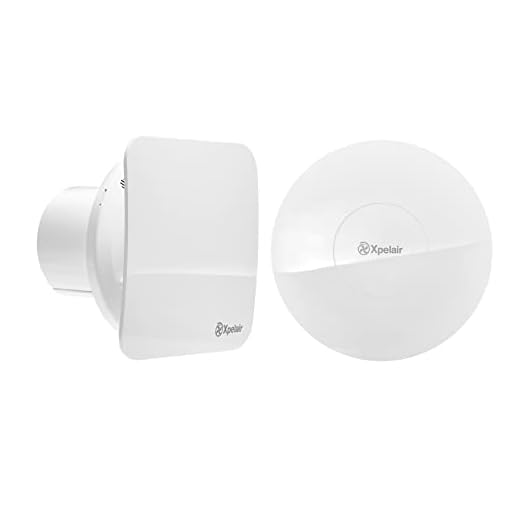

The Xpelair extractor fan cover is an essential part of maintaining proper ventilation and air quality in your home. Over time, dust, dirt, and grime can accumulate on the cover, reducing its effectiveness and potentially causing the fan to work less efficiently. To ensure the best performance of your Xpelair extractor fan, it’s important to clean or replace the cover periodically. In this guide, we will walk you through the step-by-step process of removing the Xpelair extractor fan cover.
Step 1: Before you begin, make sure that the fan is switched off and disconnected from any power source to avoid any accidents or injury.
Step 2: Locate the screws that hold the cover in place. Depending on your model, there may be one or more screws securing the cover. These screws are typically located on the front or sides of the fan housing.
Step 3: Use a screwdriver that matches the screw type and size to carefully remove the screws from their positions. Place the screws in a safe location, as you will need them to reattach the cover later.
Step 4: Once the screws have been removed, you should be able to gently pull the cover away from the fan housing. Be careful not to apply too much force or pull at an angle, as this can cause damage to the cover or housing.
Step 5: With the cover removed, take the opportunity to inspect it for any signs of wear or damage. If it appears worn or cracked, it may be time to replace the cover entirely.
That’s it! You have successfully removed the Xpelair extractor fan cover. Now you can clean or replace it as needed to ensure optimal performance and air quality in your home.
Please note: Always refer to the manufacturer’s instructions for your specific model of Xpelair extractor fan before attempting to remove or replace the cover. If you are unsure or uncomfortable performing these tasks yourself, it is recommended to seek professional assistance.
How to Remove Xpelair Extractor Fan Cover
If you need to clean or service your Xpelair extractor fan, you may need to remove the fan cover first. Here is a step-by-step guide on how to remove the Xpelair extractor fan cover:
Gather the Necessary Tools
Before starting the removal process, gather the following tools:
| – Screwdriver (either flathead or Phillips head, depending on the type of screws used) |
Get Ready for Removal
Make sure the fan is turned off and disconnected from the power source.
Locate and Remove the Screws
Use the screwdriver to locate and remove the screws that hold the fan cover in place. The number of screws may vary depending on the model of your Xpelair extractor fan, but there are typically 2 to 4 screws.
Carefully Remove the Cover
Gently pull or slide the fan cover towards you to detach it from the fan housing. Be careful not to damage any wires or the fan blades while removing the cover.
Once you have successfully removed the Xpelair extractor fan cover, you can proceed with cleaning, servicing, or replacing any parts if needed.
Remember to properly reattach the fan cover after you have finished with the necessary maintenance. Make sure that all screws are securely tightened to prevent the fan cover from falling off.
Step 1: Preparation and Safety
Before attempting to remove the Xpelair extractor fan cover, it is important to take the necessary precautions to ensure your safety and protect the equipment. Follow these steps to prepare for the removal process:
- Turn off the power: Before starting any work, make sure to turn off the power supply to the extractor fan. This will prevent any accidents or mishaps while handling the equipment.
- Gather the necessary tools: Prepare the tools you will need for removing the Xpelair extractor fan cover. This may include a screwdriver, pliers, or any other equipment that will help you with the removal process.
- Protective Gear: Wear protective gear such as gloves and safety goggles to safeguard against any potential injuries while removing the fan cover.
- Clean the area: Clear the surrounding area from any clutter or obstacles that may hinder your work. This will create a safe and comfortable workspace for the removal process.
By taking these preparation steps and ensuring safety, you can proceed with the removal of the Xpelair extractor fan cover successfully.
Step 2: Turn Off Power Supply
Before starting the procedure, it is crucial to turn off the power supply to the Xpelair extractor fan. This will ensure your safety and prevent any accidents.
Locate the main electrical switchboard in your house or building. It is usually found in a utility room, hallway, or basement.
- Open the electrical switchboard and identify the circuit breaker or fuse that controls the power supply to the Xpelair extractor fan. It might be labeled as “Xpelair fan” or something similar.
- Switch off the circuit breaker or remove the fuse to cut off the power supply.
- Double-check that the power is indeed turned off by trying to operate the fan. If it doesn’t work, you can be sure that the power supply is off.
Always follow electrical safety protocols while working with any electrical appliances to prevent electric shocks or injuries.
Step 3: Remove Screws or Clamps
Before removing the xpelair extractor fan cover, you will need to detach it from the housing unit by removing the screws or releasing the clamps holding it in place. The number of screws or clamps will depend on the specific model of your extractor fan, so refer to the manufacturers’ instructions or follow these general steps.
Option 1: Removing Screws
If your xpelair extractor fan cover is fastened with screws, you will need a screwdriver to remove them. Most extractor fans have four screws, one in each corner of the cover. Insert the screwdriver into each screw and turn it counterclockwise to loosen and remove the screws. Place them in a safe location for later reassembly.
Option 2: Releasing Clamps
If your extractor fan cover is secured with clamps, locate the clamps on each side of the cover. Press or squeeze the clamps together to release them from the housing unit. Once both clamps have been released, gently pull the cover away from the unit.
Note: Some extractor fans may have a combination of screws and clamps. In such cases, you will need to remove the screws first, followed by releasing the clamps.
With the screws or clamps removed, the xpelair extractor fan cover should now be loose and ready to be lifted or taken off for cleaning, maintenance, or replacement purposes.
Step 4: Gently Remove the Cover
Once you have disconnected the power supply, it’s time to remove the cover of the Xpelair extractor fan. Gently place your hands on both sides of the cover and give it a slight tug. The cover should easily lift up and off, exposing the inner components of the fan.
It’s important to be gentle when removing the cover to avoid damaging any of the fan’s parts. If you encounter any resistance, double-check that you have properly disconnected the power supply and try again.
Set the cover aside in a safe place where it won’t get damaged or misplaced. You may need to clean the cover separately if it has accumulated dust or dirt.
With the cover removed, you now have access to the fan blades and motor for cleaning or maintenance. Take your time to inspect them for any dust or debris buildup and clean them if necessary.


Meet Harrison Clayton, a distinguished author and home remodeling enthusiast whose expertise in the realm of renovation is second to none. With a passion for transforming houses into inviting homes, Harrison's writing at https://hutsrenovations.co.uk/ brings a breath of fresh inspiration to the world of home improvement. Whether you're looking to revamp a small corner of your abode or embark on a complete home transformation, Harrison's articles provide the essential expertise and creative flair to turn your visions into reality. So, dive into the captivating world of home remodeling with Harrison Clayton and unlock the full potential of your living space with every word he writes.